A lot of people now drop two versions of a document into a chat assistant and ask what changed. It is a reasonable thing to do. The assistants read well, explain in plain words, and are already open in a tab.
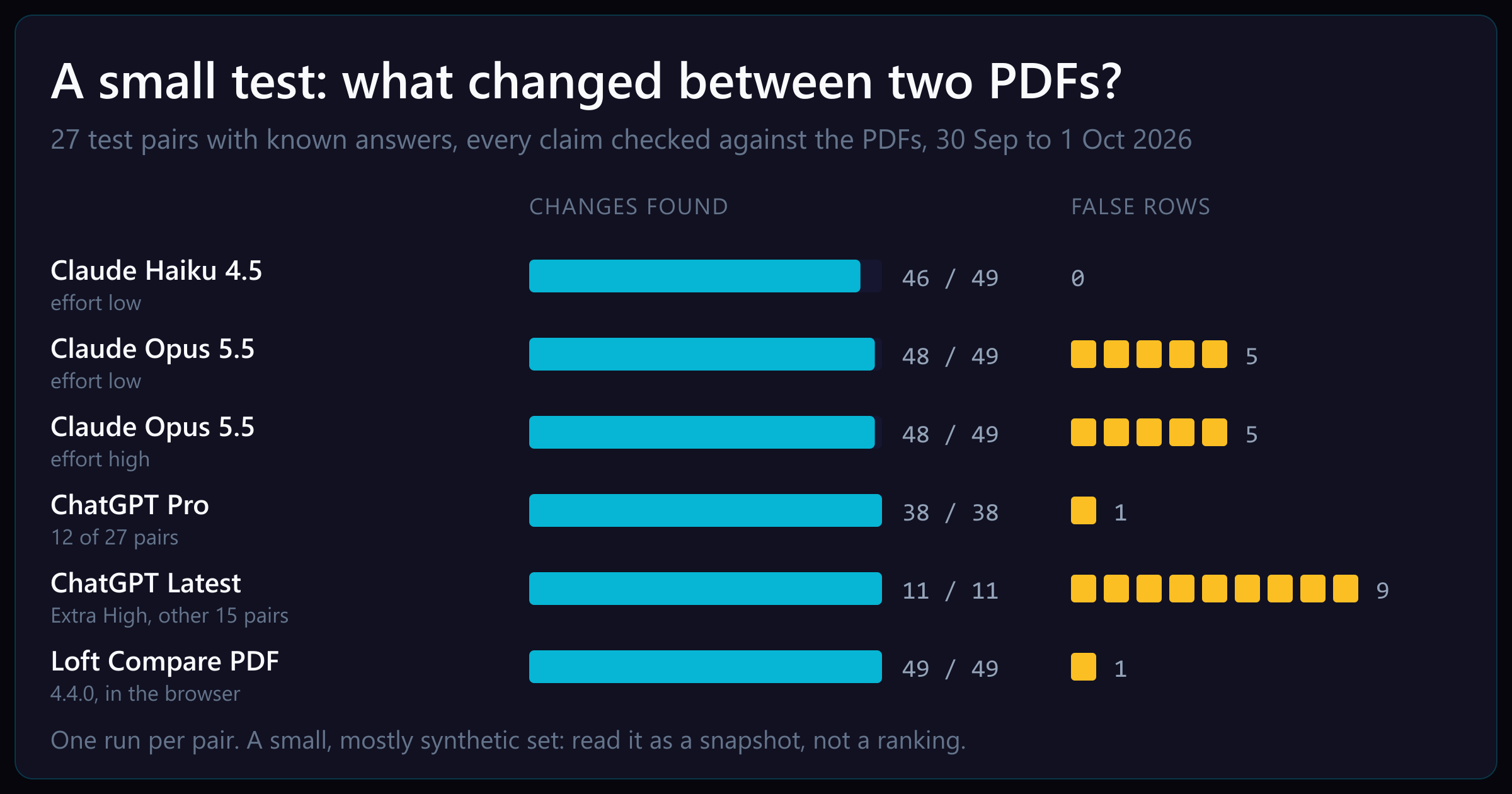
We build a PDF compare tool, so we wanted to know how that habit holds up, and where our own tool still falls short. We ran a small test: 27 pairs of PDFs whose differences we knew in advance, the same request to each assistant, and every answer checked against the files by eye.
It is a small test, and we built both the tool and the test. Please read the numbers as a snapshot of one run, not a ranking. The limits are listed at the end, and we will keep running it as the tool improves.
What we tested
The 27 pairs fall into three groups:
- 10 generated documents: contracts, a bank statement, a form, fabrication drawings and mechanical drawings, each with a few planted edits. Two of them have no edits at all, only the same document printed by a different program.
- 6 one-change pairs: two words reordered, a resistor value changed, white text added on a white page, a total edited under a black box, a table moved with one cell edited.
- 11 mixed pairs: contracts with a drawing sheet inside, a drawing set with a sheet inserted, a report with a figure moved two pages on, and six pairs where nothing changed but the file was drawn differently (shifted 3 pt, scaled 1% or 2%, set in another font, laid out on A4 instead of US Letter).
Together they hold 49 changes a reviewer should be told about.
Each assistant got both PDFs and this request, word for word:
Compare these two versions of a document: a.pdf (original) and b.pdf (revised).
List every difference a reviewer would care about: added, removed, changed or
moved text, changed numbers, dates and amounts, and text hidden from view (for
example white text or text covered by a shape). Reply with JSON only: an array
of {"kind": "add|remove|modify|move|hidden", "page": number, "before": string,
"after": string}.
The contestants, run on 30 September and 1 October 2026:
| Contestant |
How it ran |
| Claude Haiku 4.5, effort low |
Claude Code on the command line, reading the PDFs with its file tool |
| Claude Opus 5.5, effort low and high |
the same, at two effort settings |
| ChatGPT Pro |
chatgpt.com, a new chat per pair, both PDFs attached |
| ChatGPT Latest, Extra High effort |
the same, for the 15 pairs left after the Pro usage limit ran out |
| Loft Compare PDF 4.4.0 |
the engine the browser app runs, on the same computer |
We counted a change as found when any answer reported it, in any wording. A model that wrote “the parts table moved further down the page” found the moved table, even though it quoted no text. We counted a row as false when it reported something a reviewer should not be asked to check: a difference that is not there, a whole page drawn a few points over, or text that only moved because something above it grew.
The results
| Contestant |
Changes found |
Found, shown imprecisely |
False rows |
Median time per pair |
| Claude Haiku 4.5, low |
46 of 49 |
4 |
0 |
13.5 s |
| Claude Opus 5.5, low |
48 of 49 |
4 |
5 |
5.4 s |
| Claude Opus 5.5, high |
48 of 49 |
3 |
5 |
7.1 s |
| ChatGPT Pro (12 pairs) |
38 of 38 |
0 |
1 |
81 s |
| ChatGPT Latest, Extra High (15 pairs) |
11 of 11 |
0 |
9 |
90 s |
| Loft Compare PDF 4.4.0 |
49 of 49 |
0 |
1 |
0.5 s |
“Shown imprecisely” means the change was found but given the wrong kind, for example a note removed in one place and a different note added elsewhere reported as one edit. The Claude runs reported their cost at about $0.80 for all 27 pairs on Haiku and about $2.50 on Opus. ChatGPT ran on a workspace subscription.
What the assistants did well
They read meaning, not just text. Opus described the moved parts table in a sentence, and every model caught the reordered words, the changed resistor value and the edited bank balance.
ChatGPT Pro found every change in its 12 pairs, including the smallest one in the whole set: a dimension label on a fabrication drawing that moved 8 points with no change to its text. Its answer named the label and the distance, “moved upward approximately 8.25 PDF points”. Both Claude models missed that one.
Opus at both settings and ChatGPT at Extra High flagged the white text and the covered total as hidden. Haiku found both texts but listed them as ordinary edits, which a reviewer could easily read past.
Only what you ask for
Our request named hidden text outright: “text hidden from view (for example white text or text covered by a shape)”. Most people asking an assistant what changed would not think to add that. So we sent the two hidden-text pairs to Claude again with a plainer request that left that sentence out (and, with it, the “hidden” kind in the reply format):
Compare these two versions of a document: a.pdf (original) and b.pdf (revised).
List every difference a reviewer would care about. Reply with JSON only ...
Both Haiku and Opus at high effort still found the text. Neither said a reader could not see it:
white text on a white page   -> add     "Not for release"
total under a black box      -> modify  "Total due 1,500.00" -> "Total due 9,500.00"
A reviewer reading that answer would turn to the page, find no “Not for release” and see a black box where the total should be, and could reasonably decide the assistant was wrong. That is four runs on two pairs, so it shows a risk rather than a rate: an assistant answers the question it is given. Compare PDF checks every comparison for text a reader cannot see, without being asked: white or near-white text, text covered by a shape or a picture, text under 1 pt, text outside its clip or on a hidden layer. It says which of these hides each one.
Where a reviewer could be led astray
None of these is a wrong reading of the files. They are true statements that do not belong in a list of changes, and on a long document they are what makes a list hard to trust.
A page drawn a little differently. In one pair the revised file is the original with a single line added at the start of every page:
a.pdf, page 1 content:  q  BT  0 0 0 rg  /Helvetica-Bold 14 Tf ...
b.pdf, page 1 content:  q  1 0 0 1 3 -2 cm  q  q  BT  0 0 0 rg  /Helvetica-Bold 14 Tf ...
1 0 0 1 3 -2 cm moves everything on the page 3 pt right and 2 pt down. Nothing a reader cares about changed. ChatGPT at Extra High reported it, accurately, as one row per page: “All text on the page is unchanged but shifted 3 pt to the right and 2 pt downward.” It did the same for the pages scaled by 2% and 1%, and on the A4 copy it listed two paragraphs that had only reflowed onto another page. That is 9 rows across four documents where nothing changed. Re-exporting a file through another program does this to real documents all the time.
Text pushed along by an edit. When a new sheet goes into a drawing set, every sheet after it moves one page later. Opus listed each of those as moved, “now page 4, content unchanged”. It is true, and it is three extra things to look at that are not changes.
Statements about what stayed the same. Opus at high effort added a note about issues that were “same in both versions”, and Opus at low effort reported that the centre marks on two holes were missing or changed. We rendered both pages at high resolution and the marks are identical.
Compare PDF found all 49 changes in this set, and it is not perfect. On the drawing set with an inserted sheet, it listed the new sheet as one row, as it should, plus one row it should not have: the “NOTES:” heading of the sheet after it, because every sheet has that heading and the tool paired it with the wrong one. The sets we test against are also the kind of documents we build for, so this test rewards our tool’s focus. A chat assistant does something different and broader: it answers questions about the documents, explains why a change matters and drafts a reply. Compare PDF only shows what changed, on the page, side by side.
Where the files go
This is the difference we care most about. Compare PDF runs in your browser, on your computer. The two PDFs are read and compared there and are never sent to us or anyone else, so there is nothing of yours for us to keep or to train on. That also makes it quick: a pair took about half a second here, where the assistants took 5 to 90 seconds at the median.
It stays true when an AI agent does the work for you. Compare PDF can be driven by an agent through the page itself (WebMCP): the agent hands the two files to Compare PDF in your browser, the comparison runs there, and the agent gets back the list of changes, the same rows you would see. The PDFs themselves do not leave your computer.
Attaching files to a chat assistant is different: they are sent to that service. What it keeps, and whether it may learn from them, depends on the service, its settings and your plan. Some business plans promise not to train on your data, as the ChatGPT workspace we used does. For a draft contract, a personnel file or an unreleased drawing, it is worth checking before you attach it.
The limits of this test
- It is small. 27 pairs and 49 changes. One more miss moves a percentage by two points.
- Most pairs are generated. Real documents are messier, and we have not run this set of assistants on our real contracts, bills and circuit-board drawings yet.
- One run each. Assistants answer differently on different runs. A second run could find a change the first one missed, or add a row.
- ChatGPT ran on two models. Our workspace reached its Pro usage limit after 12 pairs, so the other 15 ran on the default model at its highest effort setting. We will rerun all 27 on one model.
- We wrote the answer keys and the tool. Every claim was checked against the PDFs by eye, and we gave credit for any wording that named a change, but the judging is ours.
We will keep running this test as Compare PDF changes, add real documents to it, and post again when the picture changes.
If you want to see what Compare PDF shows for your own pair of files, try Compare PDF.