Side-by-side or overlay PDF diff driven by one engine that reads each file into a structured model — text, vector geometry, images, form fields, annotations — and compares the models. Moves show as moves, edits show only where they happened, and any PDF type works without picking a mode.
Open a STEP / STP part and it measures itself — volume, thinnest wall, draft and undercut checks on load, plus hole detection with a BOM. Measure, section, export STL. Rust + WASM B-rep kernel, runs in your browser.
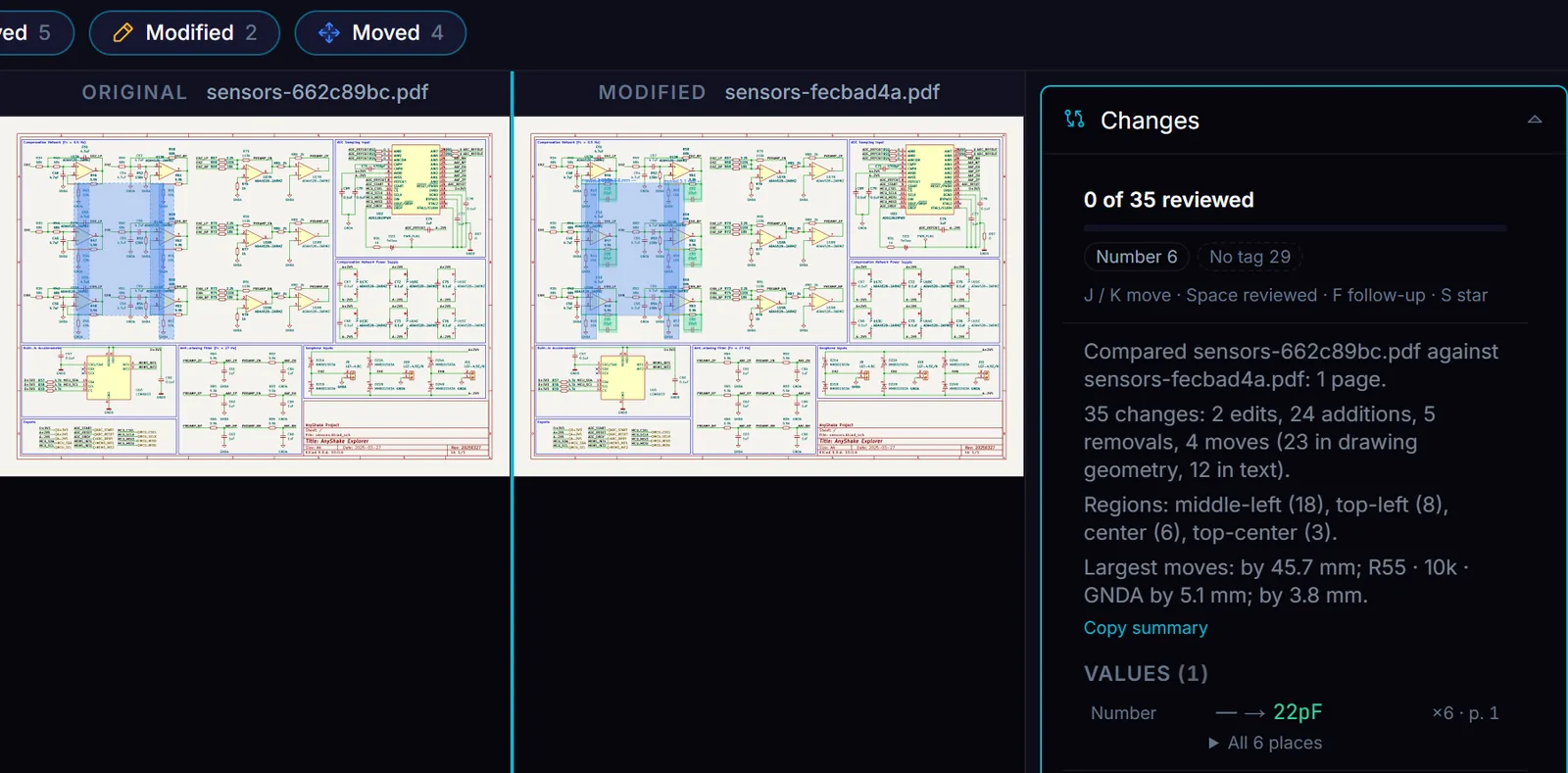
Open two revisions of a KiCad schematic in Compare PDF and it lists 35 changes: 24 additions, 5 removals, 2 edits and 4 moves. Six of them are the reason the revision exists. The rest are wires and labels that moved to make room.
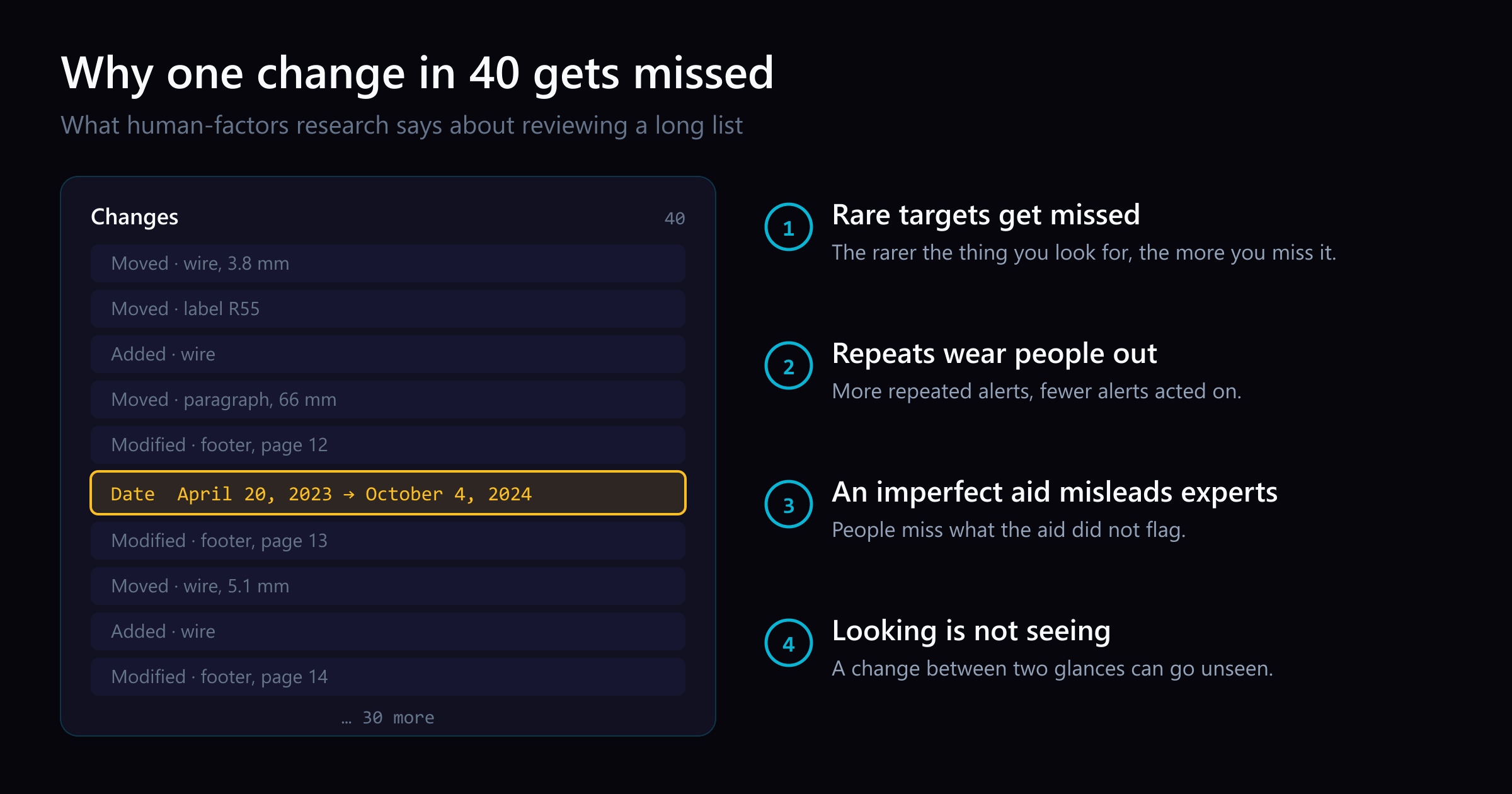
A careful reviewer can still miss one of the six. Carelessness is not the cause: human-factors research has measured how people fail at exactly this task, reading a long list in which most items do not matter. This post walks through four of those findings and what each one asks of a compare tool.
35 changes on one sheet of the anyshake Explorer sensor board. The project's history says why: capacitors C79 to C84 were added, and 12 resistors and power symbols moved to make room.
1. Rare targets get missed
Wolfe, Horowitz and Kenner studied visual search for targets that appear rarely, the way a knife turns up rarely in airport luggage. The rarer the target, the more often people missed it, even while they were searching for it.
A document review is that search. On the sensor sheet, the six new capacitors are 6 rows of 35. On a company’s bylaws, 2023 against 2024, the changed “as of” date is 1 row of 41. The reviewer is not skimming. They are doing exactly the task the study measured, and the study says the rare row is the one most likely to be missed.
What helps is taking the rare, high-stakes rows out of the crowd. Compare PDF pins every changed number, date, amount, and dimension in a Values list above the change list, so the figures are read first, whatever page they sit on.
2. Repeats wear people out
Ancker and colleagues studied the alerts received by 112 primary-care clinicians from January 2010 to June 2013. A quarter of drug alerts and a third of clinical reminders were repeats for the same patient in the same year. For each 5-point rise in the share of repeated reminders, the likelihood of accepting a reminder fell by 10%.
Documents repeat too. A footer date changes on every page. A title-block date changes on every sheet of a drawing set. Each repeat asks for attention and adds nothing new, and the research says attention runs out.
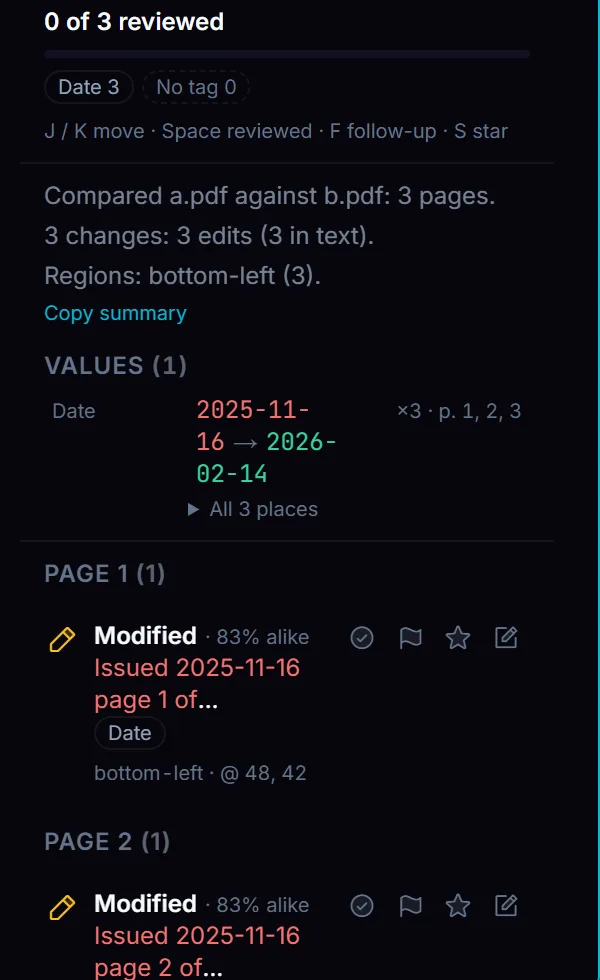
A footer date changed on all 3 pages reads as one value, ×3, with every place one click away. A test document.
What helps is showing a repeat once, with its count, and never hiding it without saying how many were hidden. Compare PDF lists a repeated change as one row with a count, and folds layout shifts out of the list with the number folded and the reason.
3. An imperfect aid misleads experts too
Parasuraman and Manzey reviewed studies of people working with decision aids. When the aid is imperfect, people make errors of omission, missing what the aid did not flag, and errors of commission, acting on what it flagged wrongly. The effect shows up in experts as well as novices, and training does not prevent it.
This is the case against a compare tool that ranks changes by importance. A reviewer who trusts a ranking stops reading where the ranking’s confidence runs out, and the change ranked low is the one they miss.
What helps is tagging facts, not importance. “Contains a date” is a rule you can check, and it never tells you to stop reading. Compare PDF tags each change with the facts it touches and keeps a “No tag” count on screen, so a change the rules miss reads as unchecked, not as unimportant. The decision about what matters stays with the person who signs the review.
4. Looking is not seeing
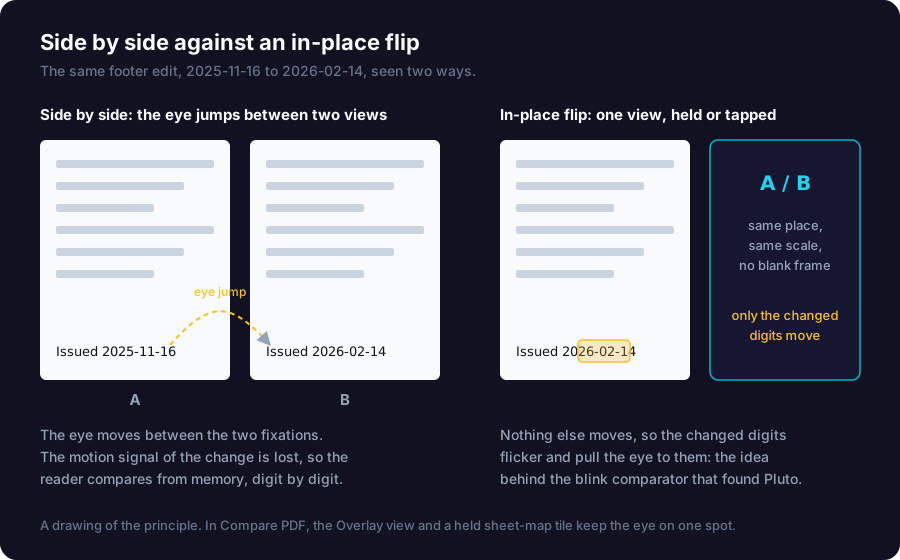
Ronald Rensink’s flicker experiments alternate an image and its edited copy with a blank frame between them. The blank hides the motion signal that normally pulls the eye to a change, so people can look straight at the change and not see it. Without the blank, the change flickers and draws the eye. The blink comparator worked on this principle: it switched between two photographic plates of the same sky, and in 1930 Clyde Tombaugh used one to find Pluto as a point of light that appeared and disappeared.
Side-by-side review has its own blank frame: the jump of the eye from one page to the other. During the jump, the motion signal is lost, and the reader compares from memory, digit by digit.
Side by side, the eye jumps and the change has no motion. In one place, only the changed digits move.
What helps is a view that stays in one place. Compare PDF’s Overlay view shows both versions in one place. In a drawing set, holding a tile on the sheet map shows the original sheet in place of the revised one.
What the four findings ask of a compare tool
Put the rare, high-stakes changes first.
Show a repeat once, with its count.
Tag what a change is; never rank what it is worth.
Show both versions in one place.
None of this replaces reading. It changes what the reader sees first, and it keeps the ranking decision with the reader. You can see it on your own revisions in Compare PDF.