Side-by-side or overlay PDF diff driven by one engine that reads each file into a structured model — text, vector geometry, images, form fields, annotations — and compares the models. Moves show as moves, edits show only where they happened, and any PDF type works without picking a mode.
Open a STEP / STP part and it measures itself — volume, thinnest wall, draft and undercut checks on load, plus hole detection with a BOM. Measure, section, export STL. Rust + WASM B-rep kernel, runs in your browser.
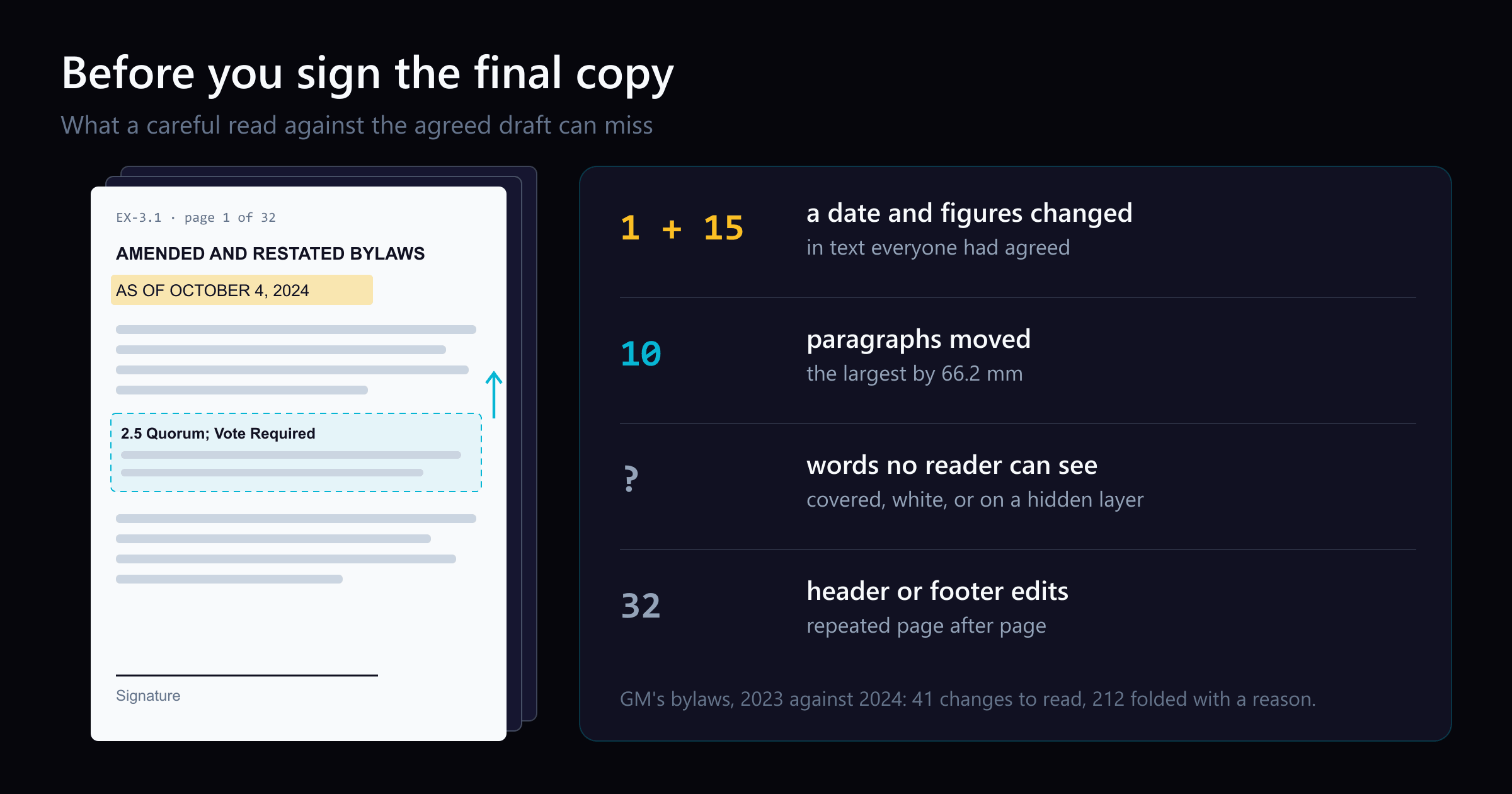
Everyone agreed the draft by email. The copy that comes back for signature is another file: exported again, sometimes retyped, occasionally edited. Most of the time the words are the same, and the one time they are not is the time that matters.
You know how to check it: read the copy against the draft, clause by clause. This guide shows four kinds of change that careful reading misses, on a real public document, and what Compare PDF shows for each.
The example: two filings of GM’s bylaws
Contracts and offer letters are private, so this guide uses a public document with the same shape. General Motors filed its amended and restated bylaws with the SEC as Exhibit 3.1 to a Form 8-K twice: as of April 20, 2023 and as of October 4, 2024. We printed each filing from its EDGAR page to PDF, 32 pages each.
Compare PDF finds 253 differences between the two. It folds 212 of them, with the reason for each, and lists 41 for a reader.
1. A date or a figure in text you already agreed
You read hardest where you negotiated. The clauses everyone agreed get a skim, because they were agreed. That is where a changed figure hides best.
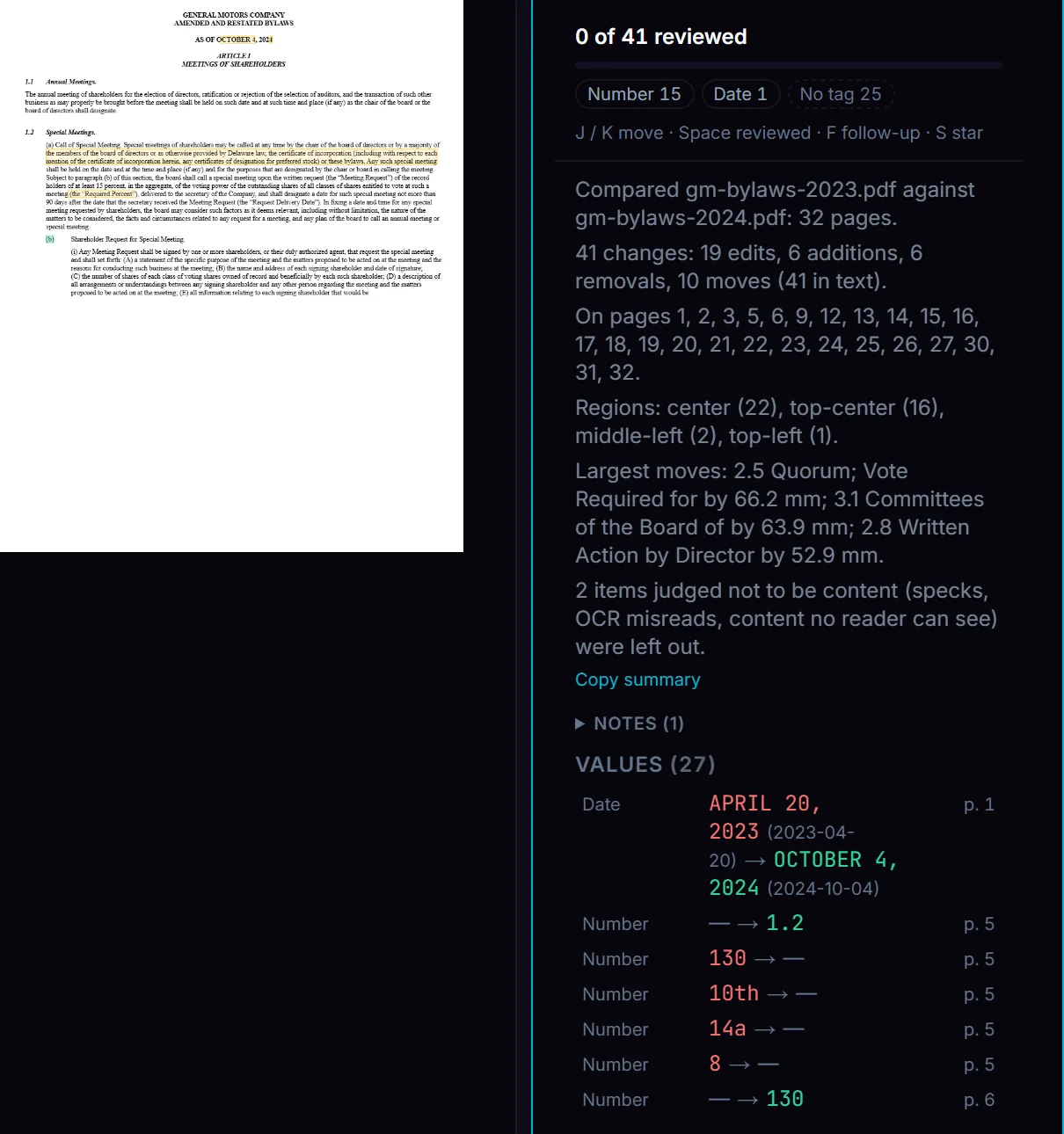
In the GM pair, the date on page 1 changed from “APRIL 20, 2023” to “OCTOBER 4, 2024”, and 15 more changes alter a number. Compare PDF pulls every changed number, date, amount, and dimension into a Values list pinned above the change list, so the figures come first, whatever page they sit on.
The summary, then every changed value, before any single change. GM bylaws, 2023 and 2024 filings.
The list also heads off a false alarm. The value 130 shows as removed on page 5 and added on page 6, because the sentence that holds it starts a page later in the 2024 filing. Read page by page, that looks like a deletion. Side by side in the Values list, it is the same value in the same sentence.
2. A paragraph that moved
Side by side, a moved paragraph reads as a deletion on one page and new text on another. You either compare the two passages word by word, or you assume they match and miss the one word that changed on the way.
In the GM pair, 10 changes are moves. The summary names the largest: section 2.5, “Quorum; Vote Required”, moved 66.2 mm, and section 3.1, “Committees of the Board”, moved 63.9 mm. Compare PDF lists each move as one change, with the distance, and a passage that moved and was also edited reads as both.
3. Words no reader can see
A PDF can hold text that no reader sees: text turned white, covered by a box, placed off the page, or put on a layer that is hidden. A careful reader cannot see it, by definition. Search, copy, and a text extractor still find it.
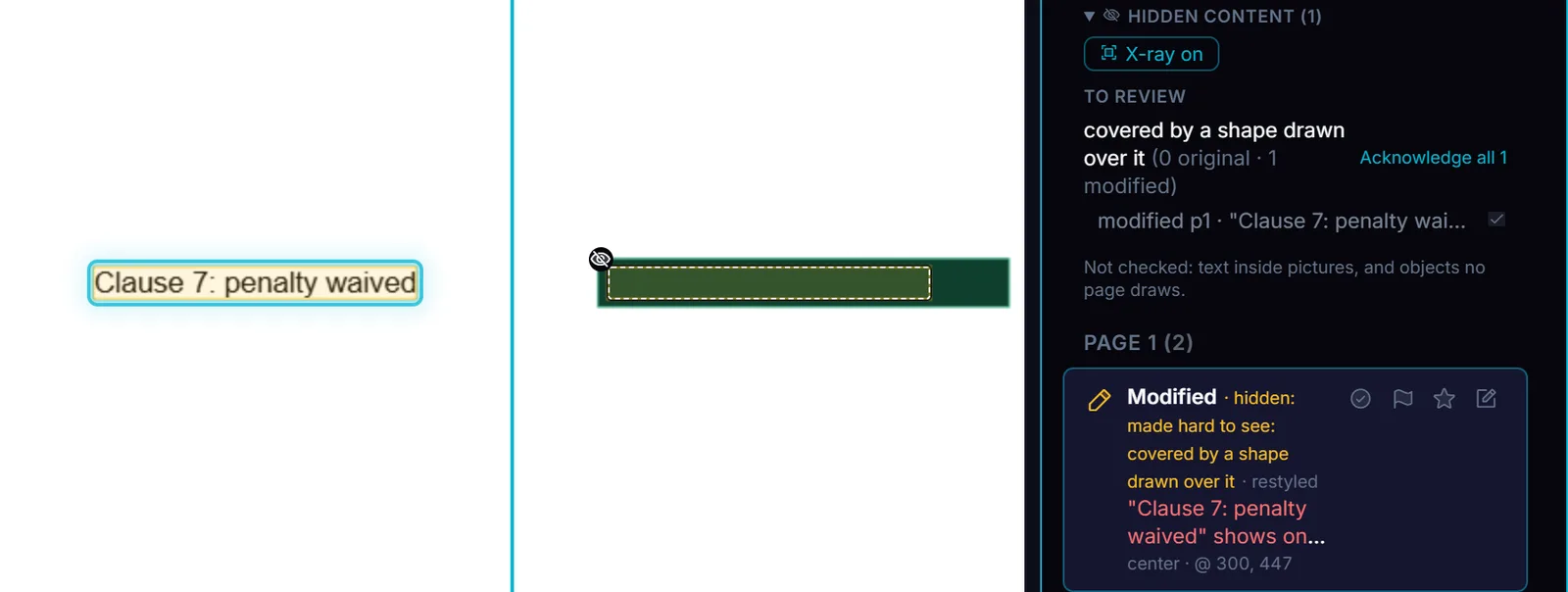
The GM bylaws hold no hidden content. To show what it looks like, the next figure uses a one-page test file: in the modified version, a box is drawn over the line “Clause 7: penalty waived”. The page shows a bar, and the words are still in the file.
The line is still in the file under the box, and the change says so. A test pair.
Compare PDF lists such a change, marks it hidden, and names the cause: “covered by a shape drawn over it”. X-ray outlines each hidden item on the page. If a file holds earlier saved versions, the Hidden content panel says so too, because an earlier version can hold text removed before the last save.
4. An edit repeated on every page
A 32-page document repeats its header and footer 32 times. Check page 1 and you assume the rest match. Check all 32 and you are tired before you reach the clause that matters.
In the GM pair, 32 of the differences are header or footer edits repeated on every page after the first, and 175 more are text that moved because something above it grew or shrank. Compare PDF folds these out of the list, and always says how many it folded and why. A change repeated in several places is one row with a count, and every place is one click away.
Before you sign, keep the record
The review is only useful later if someone can tell which file you checked. The review report’s cover names both files by SHA-256 hash, a fingerprint of each file’s bytes, so the copy you sign can be matched to the copy you checked.
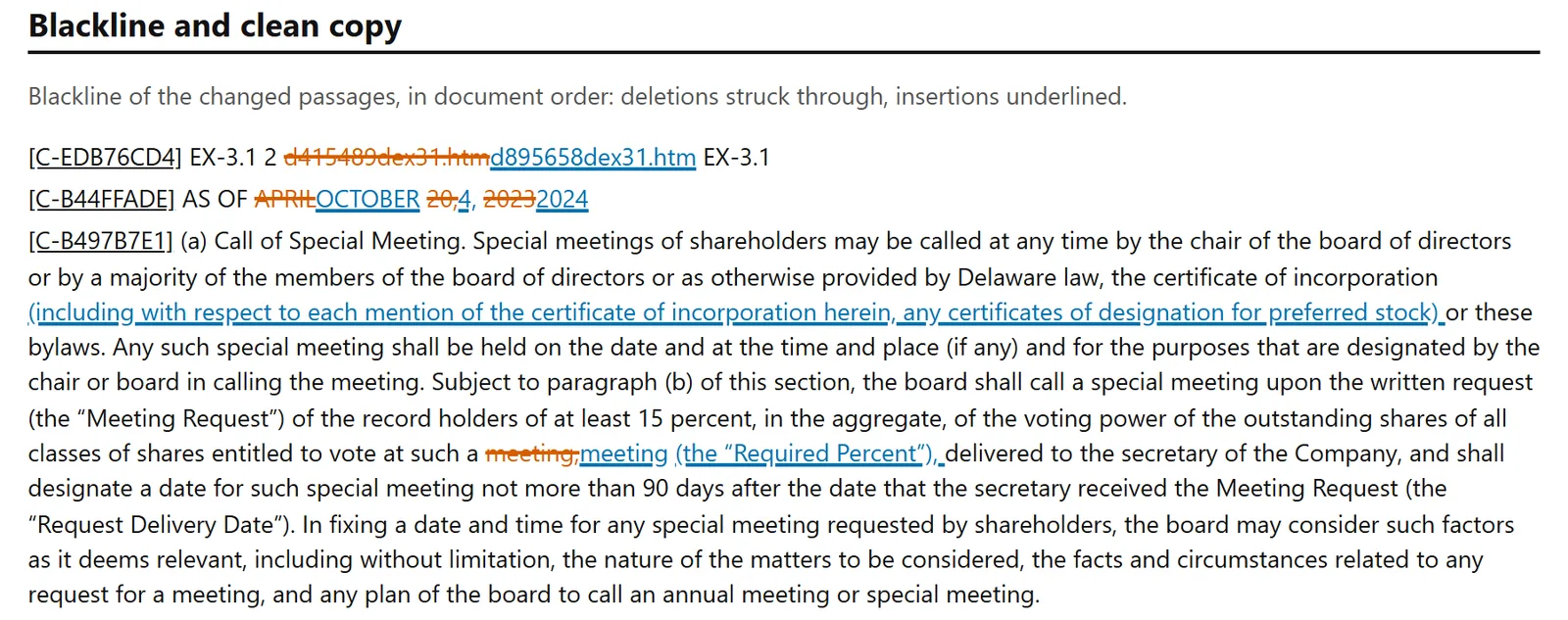
The Legal preset adds a blackline of the changed passages, deletions struck through and insertions underlined, and states that the modified file itself remains the clean copy of record. The HR preset lists each change under its policy section, with each version’s stated effective date.
The Legal preset's blackline, one passage per change, each with its change ID. GM bylaws, HTML report.
What the compare does not check
The report states its own limits, and they are worth reading before you file it:
Text inside a picture is read only if OCR ran on that page, and OCR can misread. Check values on scanned pages by eye.
Document metadata, embedded files, scripts, and objects no page draws are not compared.
Fact tags come from stated text rules. A value the rules do not recognize carries no tag.
The report lists what the compare detected. It does not certify that the files are otherwise the same.
To check a copy before you sign it, open the agreed draft and the copy you received in Compare PDF.