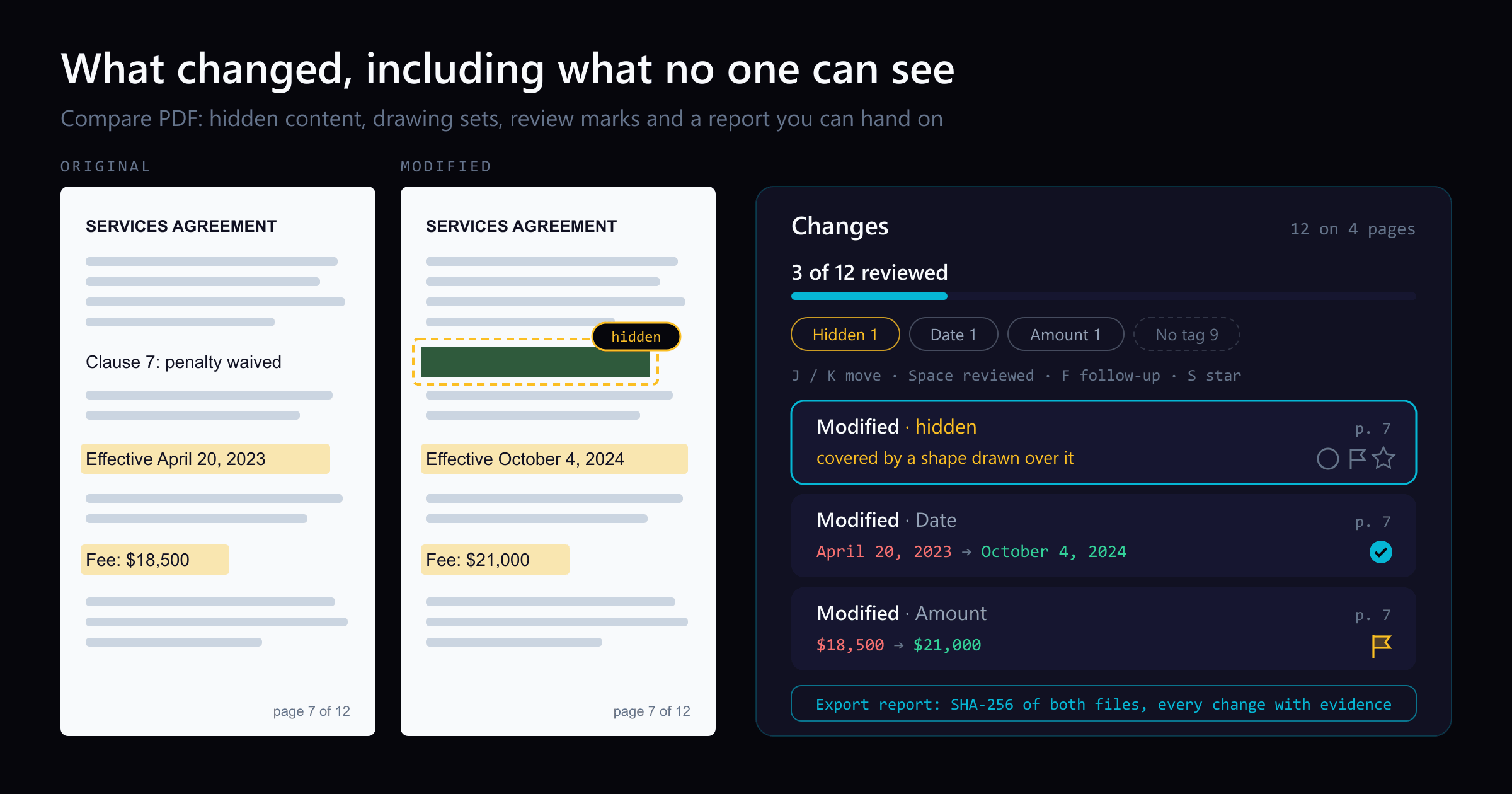
Side-by-side or overlay PDF diff driven by one engine that reads each file into a structured model — text, vector geometry, images, form fields, annotations — and compares the models. Moves show as moves, edits show only where they happened, and any PDF type works without picking a mode.
Open a STEP / STP part and it measures itself — volume, thinnest wall, draft and undercut checks on load, plus hole detection with a BOM. Measure, section, export STL. Rust + WASM B-rep kernel, runs in your browser.
You already know how to compare two documents. Put them side by side, read line by line, check the numbers, and for a drawing, follow the revision clouds. That method is sound, and it still misses things, because some changes are built so that careful reading cannot see them.
Here are six of them, and what this release of Compare PDF shows for each. It all runs in your browser tab, so your files stay on your computer.
1. The clause no reader can see
A PDF page is not a picture of text. It is a list of drawing instructions, and later instructions paint over earlier ones. Here is a simplified version of the instructions on one test page:
BT /F1 11 Tf 72 640 Td (Clause 7: penalty waived) Tj ET % draw the clause0.18 0.35 0.24 rg % pick a dark green fill70 636 150 16 re f % fill a box over it
You read the page and see a green box. Search, copy, and any text extractor still find “Clause 7: penalty waived”. No amount of careful reading shows you text that is drawn and then covered.
Covering is one way among several. Text can also sit on a hidden layer, be white on white, fall outside its clipping area, be set smaller than 1 pt, or use a character map that makes it read differently than it looks.
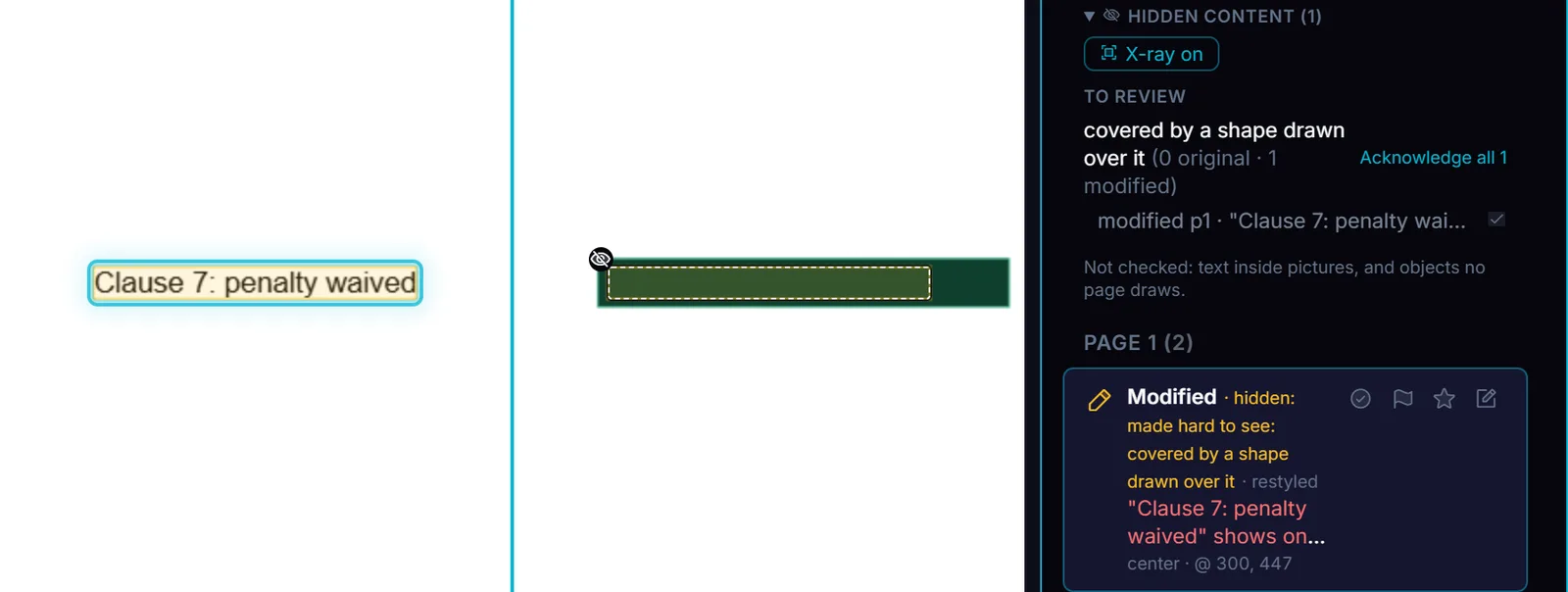
Compare PDF lists each of these as a change, marks it hidden, and names the reason. X-ray outlines the hidden item on the page, and the Hidden content panel lists what each file hides.
The clause from the instructions above, covered by a box on the modified page. It is listed as a change, marked hidden, and outlined by X-ray. A test pair.
2. Text deleted before the last save
A PDF can be saved in increments. Each save appends the changed objects to the end of the file, and the earlier version stays inside it:
%PDF-1.7... the first version's objects ...xref ... trailer << /Size 42 /Root 1 0 R >>startxref 91233%%EOF... the objects the second save changed ...xref ... trailer << /Size 45 /Root 1 0 R /Prev 91233 >>startxref 104560%%EOF
A viewer shows you only the last version. If a sentence was removed in the second save, the file you were sent still carries it, and nothing on screen says so. Compare PDF finds these earlier versions and compares the first saved version with the last, so text removed before a later save shows up as a change.
3. One date among 41 changes
Visual search research has a plain finding: the rarer the thing you are looking for, the more often people miss it, even while they are looking for it. One changed date among dozens of reflowed paragraphs is that kind of target. So is one changed dimension among thirty redrawn wires.
On a company’s bylaws, 2023 against 2024, Compare PDF lists 41 changes. One of them is the date on the first page, “AS OF APRIL 20, 2023” to “AS OF OCTOBER 4, 2024”. Fifteen more change a number.
Compare PDF pulls every changed number, date, amount, and dimension into a Values list pinned above the change list, as old → new, in the document’s own words. The figures come first, whatever page they are on. A “No tag” count stays on screen, so a change the value rules miss still reads as unchecked, not as unimportant.
4. The change buried in repeats
The same bylaws pair has 253 differences in all. 175 of them are text that moved because something above it grew or shrank, 32 are header or footer edits repeated on every page after the first, and 5 are pieces of a longer edit already listed as one change. Reading all 253 wears you out before you reach the ones that matter. Skipping them means trusting that each one is only what it looks like.
Compare PDF folds layout shifts and repeats out of the main list, and always shows how many it folded and why. What is left is the 41 changes that need a reader. A change repeated in several places is one row with a count, and marking that row reviewed marks every place it stands. Review marks and a progress count keep your place, and the marks stay with the same two files, so comparing them again brings your review back.
5. A drawing changed outside its revision cloud
Reviewers of an addendum lean on the drafter’s markings: the revision clouds, the scalloped outlines around revised areas, and the revision block on each sheet. The markings are only as complete as the drafter made them.
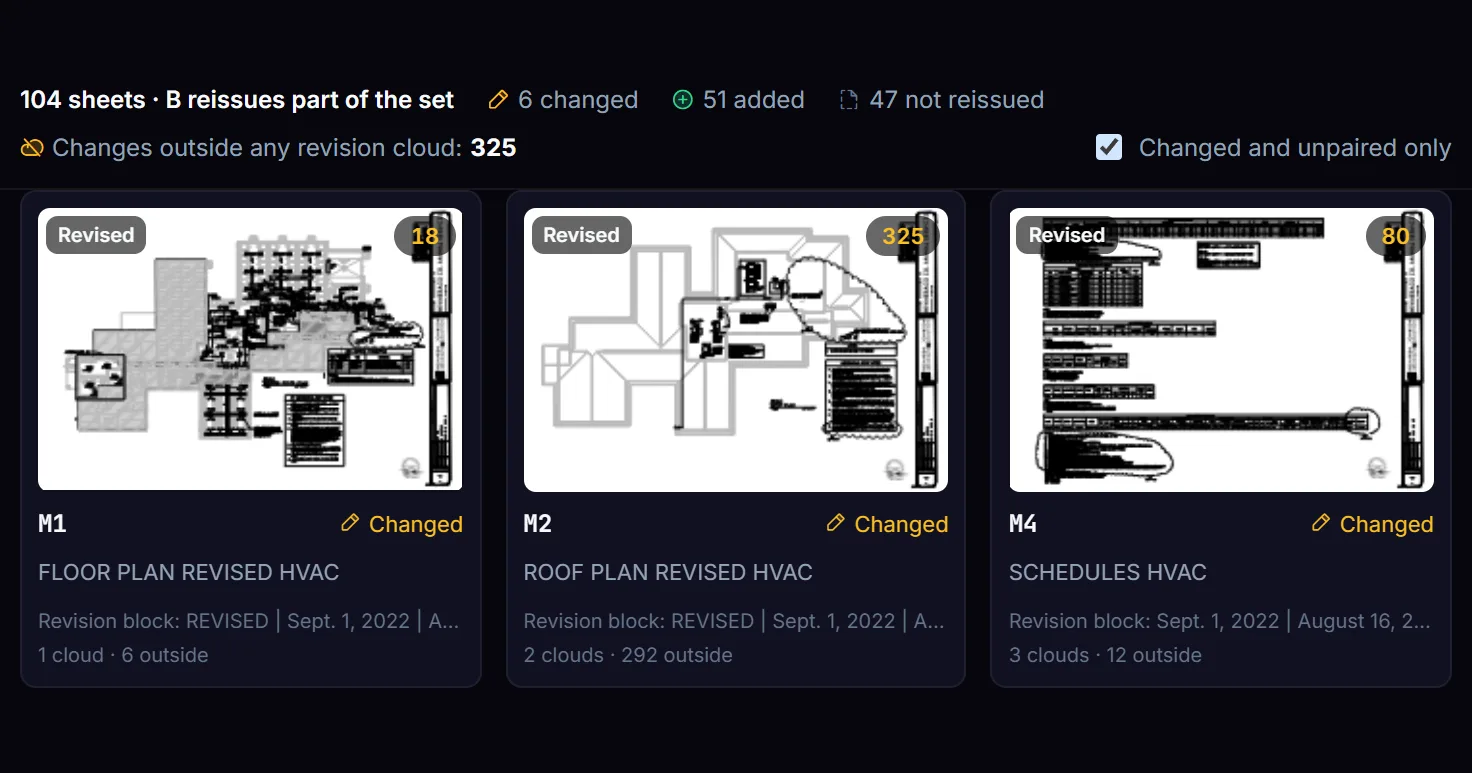
On Winnebago County, Illinois, bid 22-020 and its first addendum, Compare PDF found 325 changes on the reissued sheets that sit outside any revision cloud. Sheet M2 alone has 292 of them against 2 clouds. Sheet C104 has 3 changes, no cloud at all, and no new revision entry.
The sheet map for the addendum. Each tile counts its changes, its clouds, and the changes outside them.
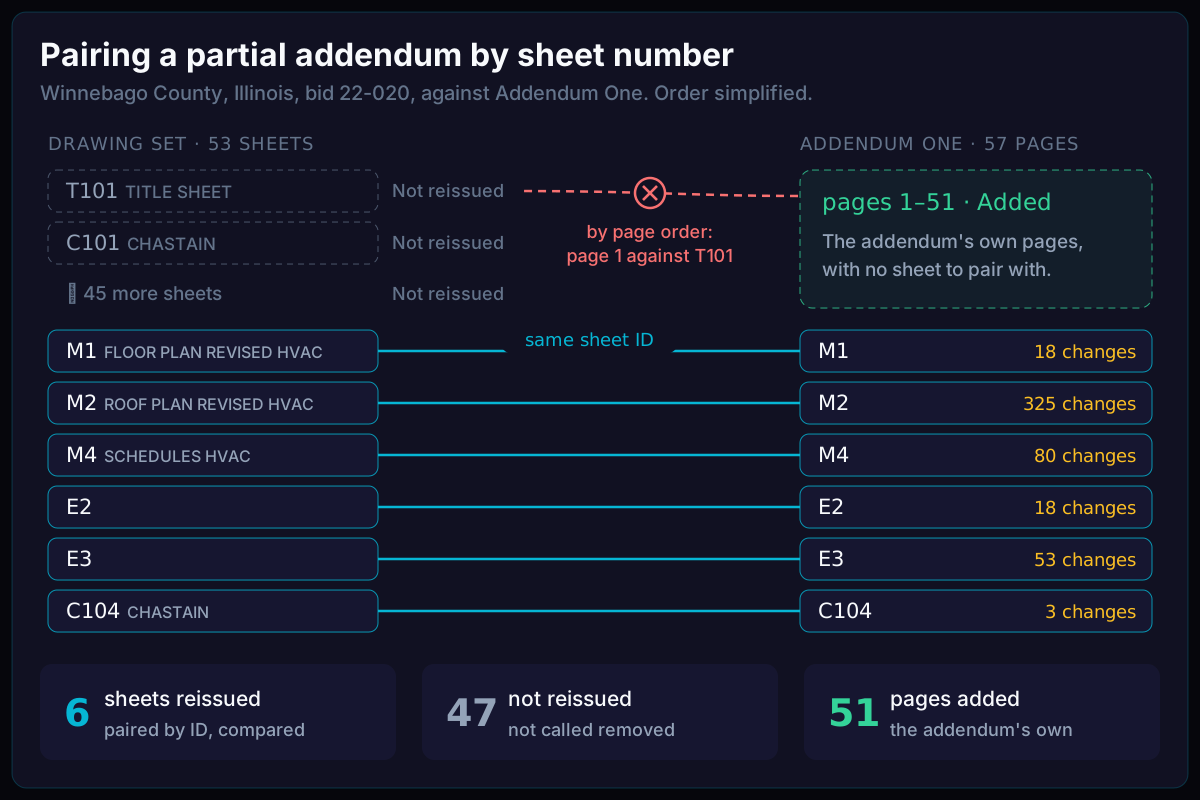
There is a second trap in a partial addendum: putting the wrong sheets side by side. This addendum reissues 6 sheets and puts 51 pages of its own in front of them. Paired by page order, its first page lands against the title sheet, and every pair after it is wrong. Compare PDF pairs sheets by the number in the title block. It calls the 47 sheets the addendum leaves out “Not reissued”, not “Removed”, and the addendum’s own pages “Added”.
Pairing by sheet number puts M1 against M1. Pairing by page order puts the addendum's first page against the title sheet.
6. A signature that still looks signed
A signed PDF can be saved again after signing, and the signature on the page looks the same as before. Researchers who tested 29 PDF viewers found 16 that showed content changed after signing while still reporting the signature as valid.
Compare PDF reads each signature and says what it covers, whether content was added after signing, and the certification level. It checks that the signed bytes are intact, and it can compare the signed version with the current file, so the changes after signing show up as ordinary changes. The check runs in your browser and never calls a signature legally valid. For a legal check, use a qualified validation service.
Hand on what you checked
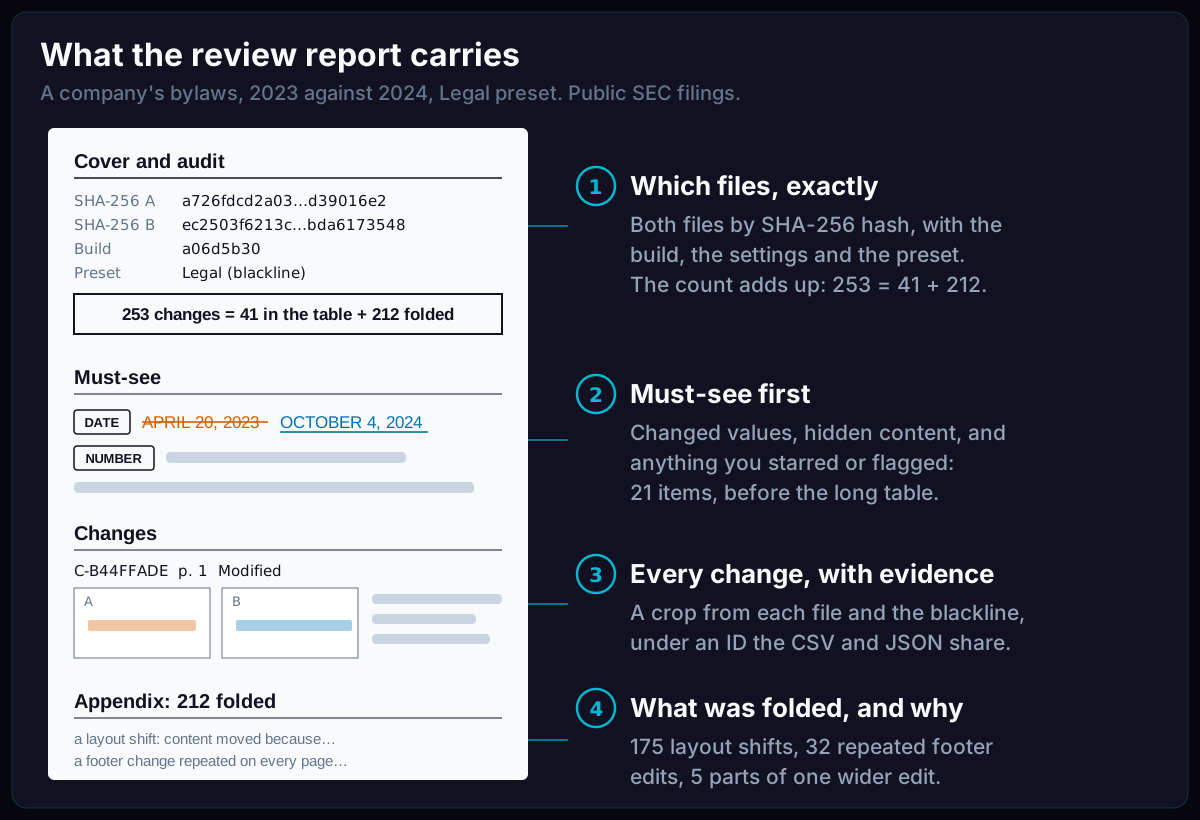
A review is often read later, by someone who was not there. Compare PDF exports a PDF or HTML report that states which files were compared, by their SHA-256 hashes, with what settings, and what it folded away and why. The items that matter most come first.
The four parts of the report, with the numbers from the bylaws report.
Each change keeps one ID in the report and in the CSV and JSON exports. Here is the bylaws date change as the JSON export writes it, trimmed to the fields that matter here:
{ "id": "C-B44FFADE", "kind": "modify", "layer": "text", "pageA": 1, "pageB": 1, "before": "AS OF APRIL 20, 2023", "after": "AS OF OCTOBER 4, 2024", "moved": true, "tags": ["date"], "review": "unreviewed"}
Try it
Open two versions of a contract, a policy, or a drawing set in Compare PDF. The full list of changes in this release is in the changelog.