Side-by-side or overlay PDF diff driven by one engine that reads each file into a structured model — text, vector geometry, images, form fields, annotations — and compares the models. Moves show as moves, edits show only where they happened, and any PDF type works without picking a mode.
Open a STEP / STP part and it measures itself — volume, thinnest wall, draft and undercut checks on load, plus hole detection with a BOM. Measure, section, export STL. Rust + WASM B-rep kernel, runs in your browser.
A bid addendum comes as a letter and a handful of reissued sheets. The letter says “Delete sheet M1 and replace it with attached sheet M1 with a revision date September 1, 2022”. On each reissued sheet, the drafter draws a revision cloud, the scalloped outline, around what changed, and updates the revision block.
A careful reviewer works from those markings: read the letter, open the named sheets, check inside the clouds. The markings are the drafter’s own list of what changed, and a list made by hand leaves things out. This guide shows four gaps on a real public bid set, and what Compare PDF shows for each.
The example: Winnebago County bid 22-020
Winnebago County, Illinois, published the drawings and addenda for project 22-020 (IFB 22B-2240): additions and renovations at Winnebago County Animal Services. This guide uses two of its public files, under the names the county gave them:
22-020_addendum_one.pdf: Addendum One, dated September 1, 2022, 57 pages. The first 51 pages are the written addendum, the pre-bid meeting notes, bid forms and specification sections. The last six pages are drawing sheets.
1. A sheet the letter never names
Items 8 to 12 of Addendum One replace sheets M1, M2, M4, E2, and E3. The letter’s summary also lists a “Construction Fence layout drawing”, without a sheet number. A reviewer working from the letter opens five sheets and looks for the fence somewhere else.
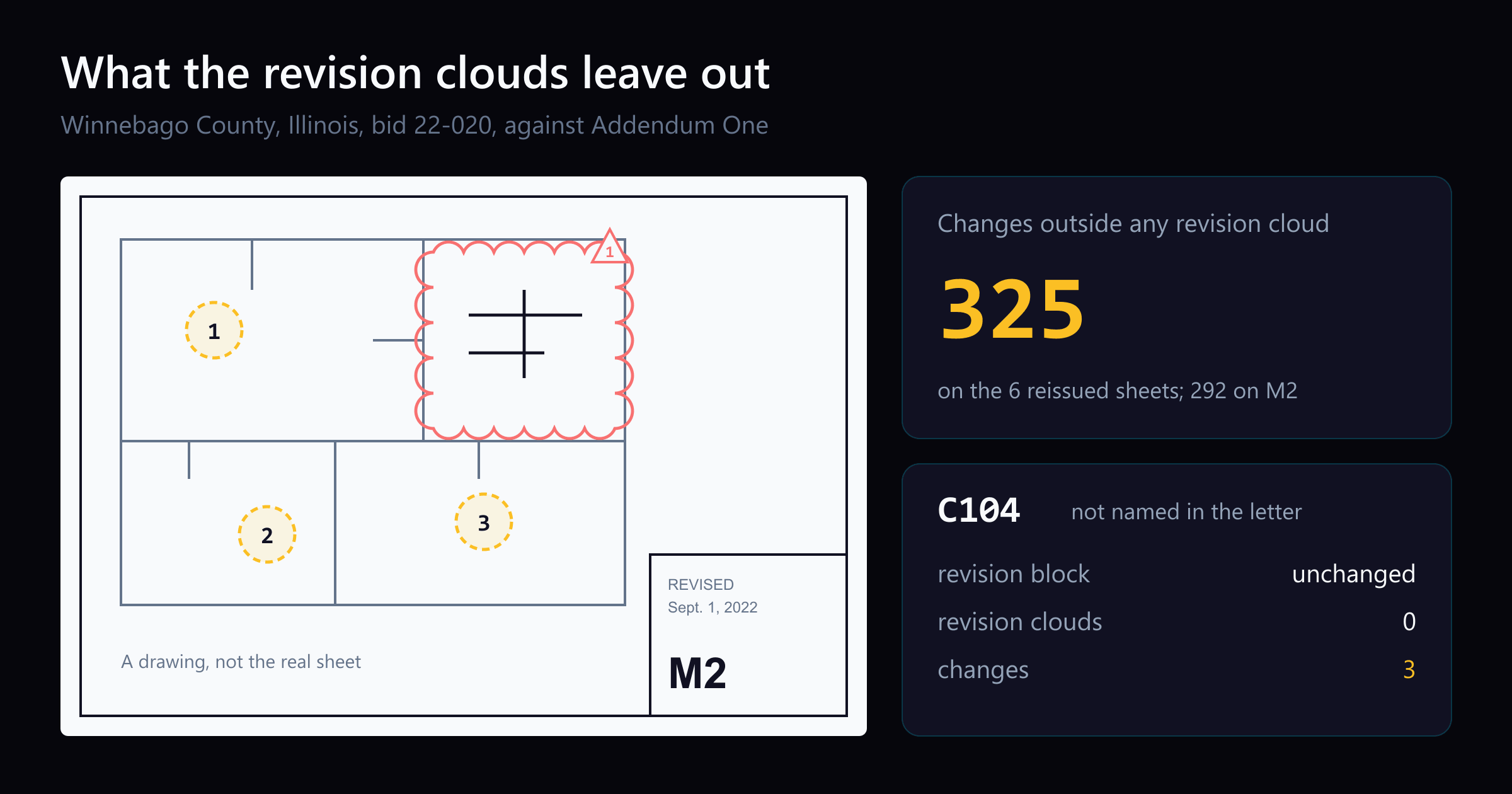
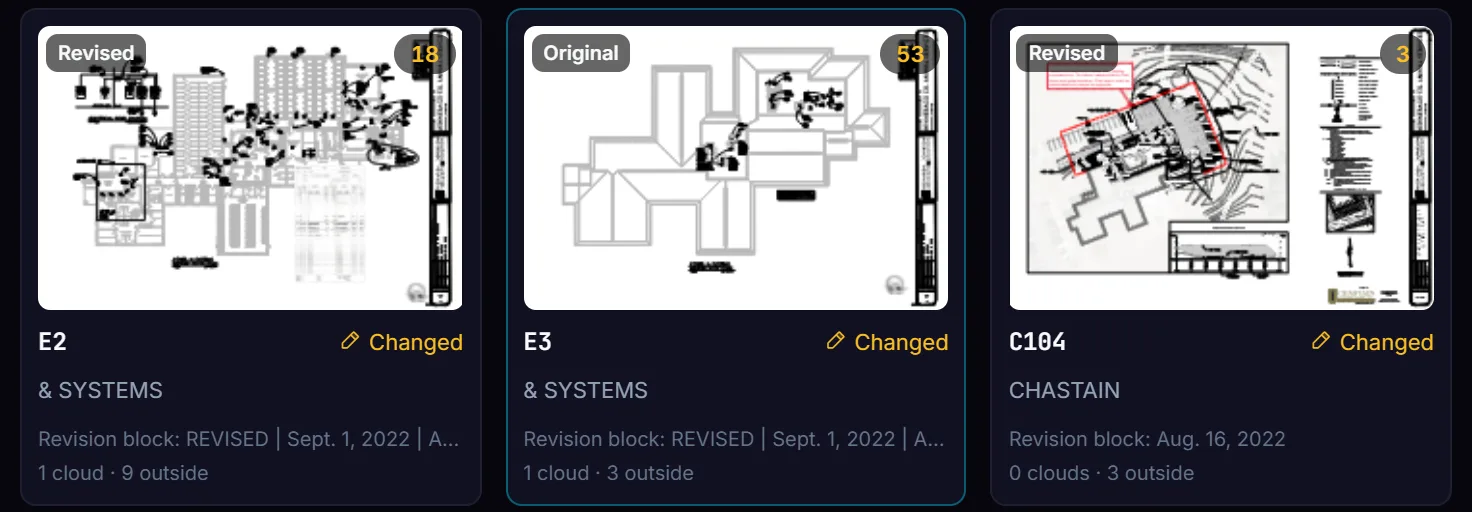
The addendum also reissues sheet C104. Its revision block still reads Aug. 16, 2022, and it carries no revision cloud. Nothing on the sheet says it changed. Compare PDF pairs every reissued sheet with the base sheet of the same number, so C104 is compared like the others, and its tile on the sheet map shows 3 changes and 0 clouds.
C104 counts no cloud and its revision block did not change, yet it has three changes. The E3 tile is held down, so it shows the original sheet.
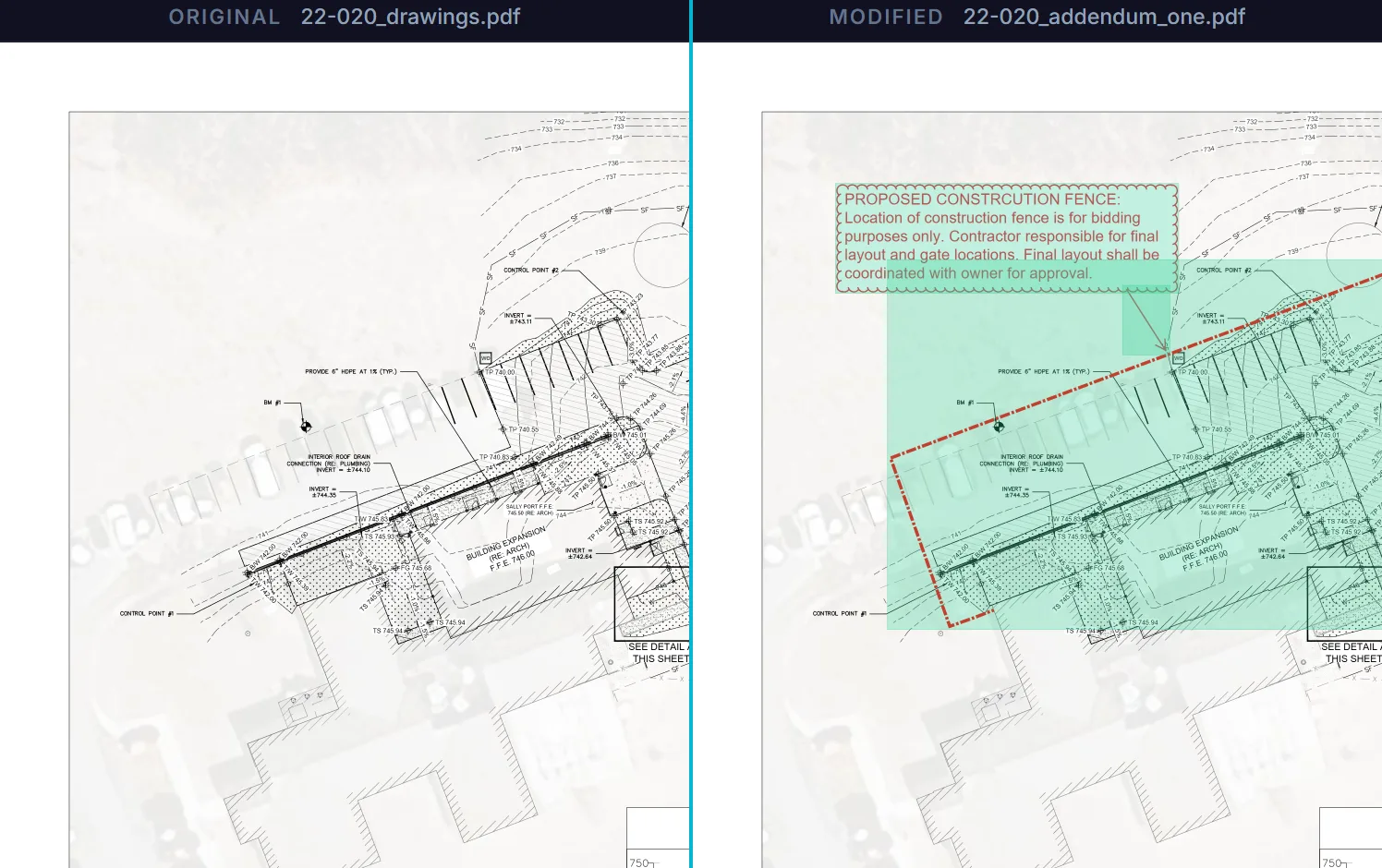
The three changes are the construction fence: a red dashed fence line and a boxed note, “Location of construction fence is for bidding purposes only”, drawn as PDF markups rather than as drawing lines. That is the fence drawing the letter lists without a sheet number.
Green marks what only the addendum has: the fence line and its note. No revision cloud surrounds the fence. Winnebago County bid 22-020, sheet C104.
2. Changes outside the clouds you did open
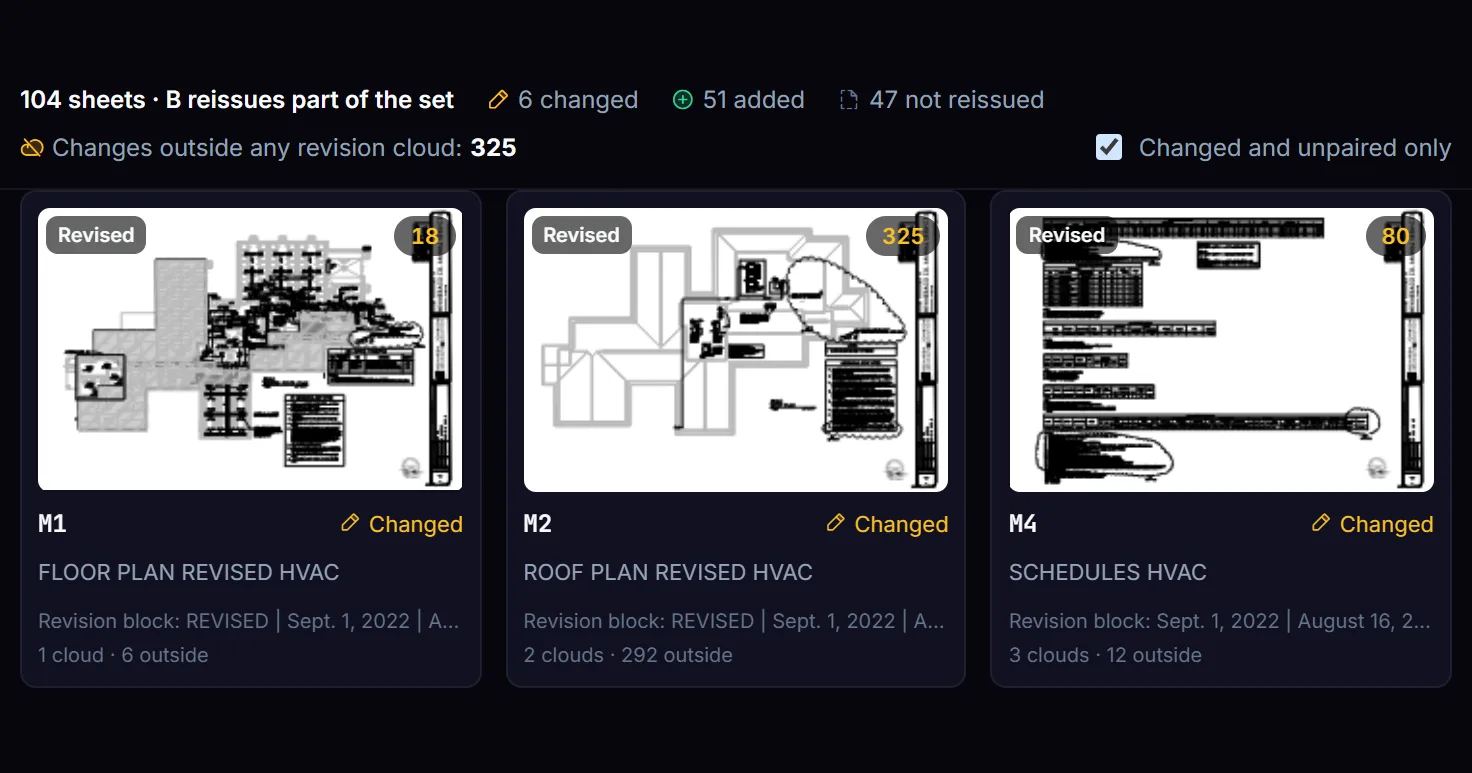
Even on the sheets the letter names, the clouds cover only part of what changed. M1 has 18 changes, 1 cloud, and 6 changes outside it. M2 has 2 clouds and 292 changes outside them. A reviewer who checks inside the clouds and signs off has checked a small share of M2.
Compare PDF counts, for each sheet, its clouds and the changes outside all of them. Across the six reissued sheets of this addendum, 325 changes sit outside any cloud.
Each tile counts its changes, its clouds, and the changes outside them. M2: 2 clouds, 292 changes outside.
When most of a sheet’s changes sit outside its clouds, that sheet needs a full read, not a check of its clouds.
3. The wrong sheets side by side
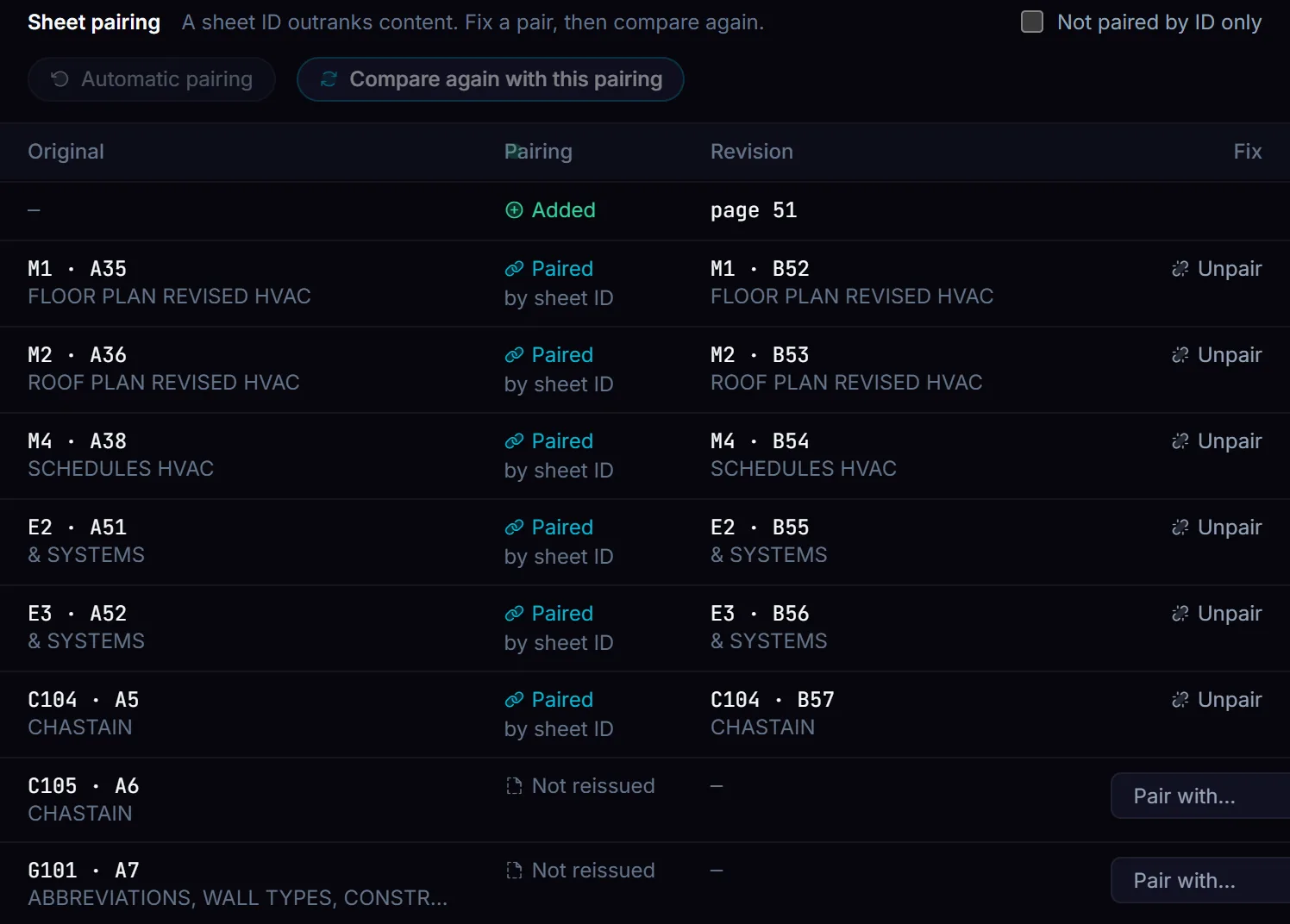
The addendum puts its 51 written pages first and its six sheets last. Paired by page order, the addendum’s first page lands against the base set’s title sheet, and nothing after it lines up. Compare PDF reads the sheet number in each title block, the way a reviewer would, and pairs M1 with M1 wherever each sits in its file.
The 47 base sheets the addendum leaves out read “Not reissued”, not “Removed”: a partial addendum does not delete them from the project. The 51 written pages have no sheet number, so they read “Added”, each named by its page number.
Six sheets pair by their sheet number, C104 among them. Every other row is named for what it is.
A sheet without a readable number pairs by content or by order instead, and the pairing view says which. If a pair is wrong, you can fix it and compare again.
4. A layer that does not show
Drawings exported from CAD often carry layers, and a layer can be hidden when the file opens yet still print. Changes on such a layer never show on screen, so no amount of looking finds them.
Compare PDF lists both files’ layers side by side, marks a layer that “prints, hidden on screen”, and lists the changes drawn on layers hidden when the file opens. Both Winnebago files show every layer when they open, so nothing hides this way here. On another set, this is where a change you cannot see would appear.
Check the letter against what changed
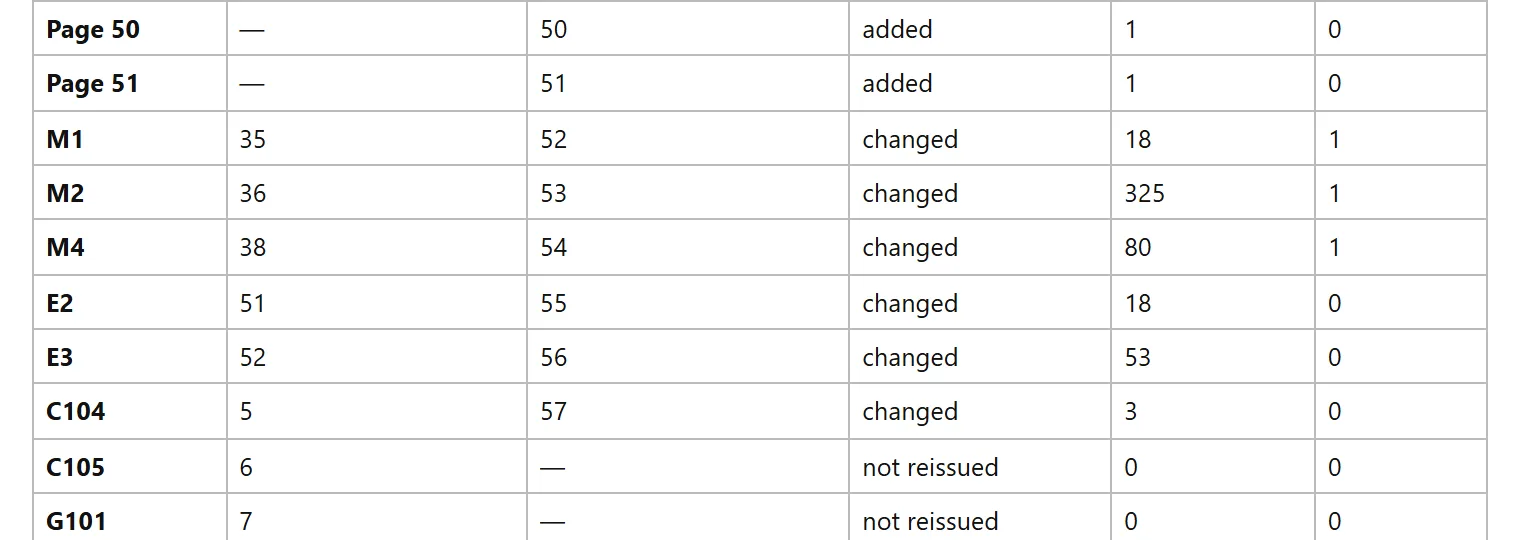
The letter is the checklist, and the compare is the check. The AEC report lists every sheet with its status and its number of changes, then each sheet’s changes in addendum order.
Sheet, original page, modified page, status, changes, and folded items. Winnebago County bid 22-020, HTML report.
For Winnebago, the five sheets the letter names all changed, and so did C104, the fence drawing. On M1, the list includes the added note “EXTEND REFRIG LINE SETS AND CONTROL WIRING”. Anything the report shows beyond the letter is a question for the design team.
To check your next addendum the same way, open the base set and the addendum in Compare PDF.